
Sign in, confirm email, or reset your password
Understand the different account emails and what to check.
The numbers in these website screenshots identify controls and statuses, not a required click sequence. Example records and amounts are illustrative; mobile layouts may differ.
Use the right account flow
Signup confirmation verifies a new account. Password reset changes access to an existing account. Receiving one type of email does not prove the other flow works.
- Check the address entered during signup.
- Check spam and filtered mail.
- For an existing account, use the sign-in screen and its password-reset option when needed.
- If an authenticator challenge appears, use the account's enrolled authenticator or supported recovery process.
Never share a password, authentication code, or recovery link in a screenshot.
Set up an authenticator
Open Settings while signed in and find the authenticator section. Begin enrollment only when you have your authenticator ready, then complete the confirmation shown by Clasp.
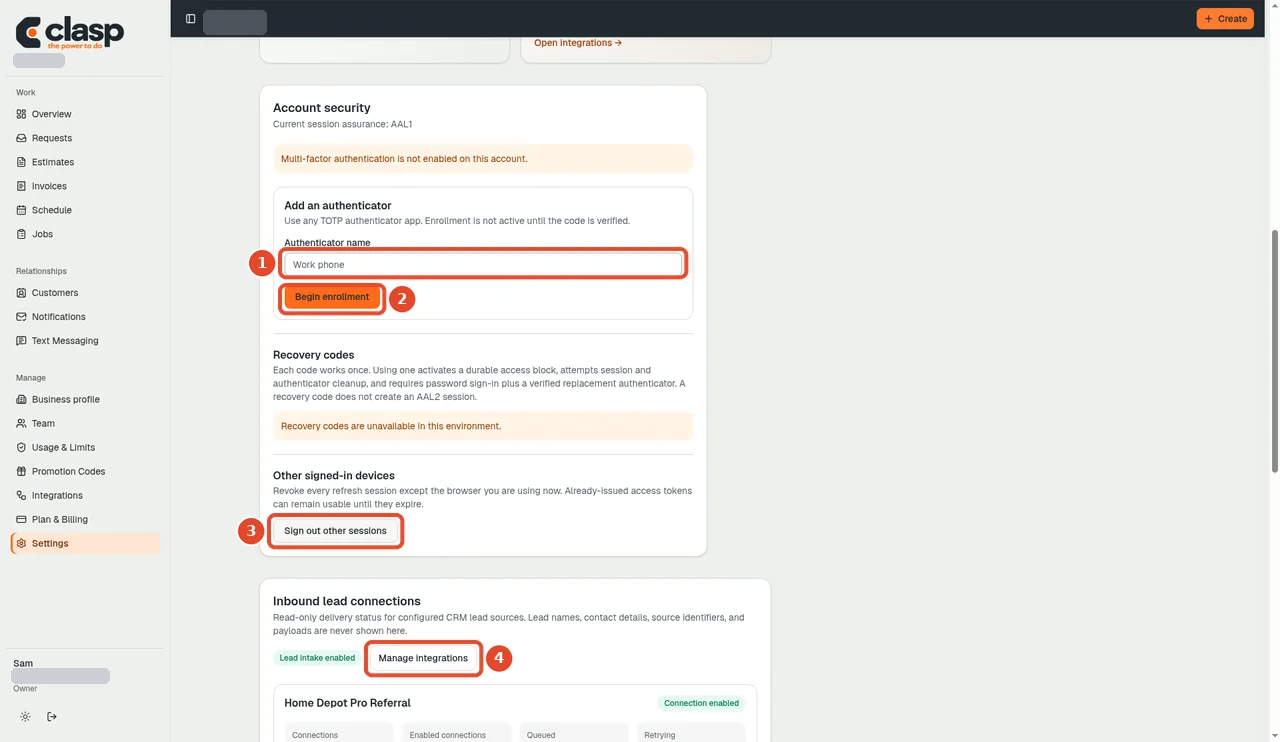
Numbered controls in this screenshot
- 1 — Authenticator name: Enter a recognizable name for the authenticator you are enrolling.
- 2 — Begin enrollment: Start enrollment, then complete the instructions and code verification shown next. Clicking this alone does not finish enrollment.
- 3 — Sign out other sessions: Use only if you intend to end your other sign-in sessions; it is not an enrollment step.
- 4 — Manage integrations: This is a separate integrations shortcut, not part of authenticator setup.
Documentation boundary
The screenshot shows signed-in authenticator settings, not signup confirmation or password reset. It does not demonstrate either email flow. This help-center import does not repeat those workflows; they remain part of the later guide-validation phase.
When asking for help
Provide the email address privately to support, the approximate time, which flow you used, and whether the email failed to arrive or its link failed. Do not repeatedly create accounts or request that verification be bypassed.
Fresh signup, confirmation-link completion, and password recovery will be checked in the next testing phase.