
Start or continue your no-card trial
Activate a Clasp trial without entering card details and understand the included voice allowance.
The numbers in these website screenshots identify controls and statuses, not a required click sequence. Example records and amounts are illustrative; mobile layouts may differ.
Before you start
Use a verified Clasp account with owner or admin access to the workspace. Trial activation needs an internet connection.
On the website
-
Sign in and select the intended workspace.
-
Open Plan & Billing.
-
Choose the free-trial action shown for that workspace.
-
Check the returned status and trial end date.
-
If the trial is already running, choose Continue trial to return to your work.
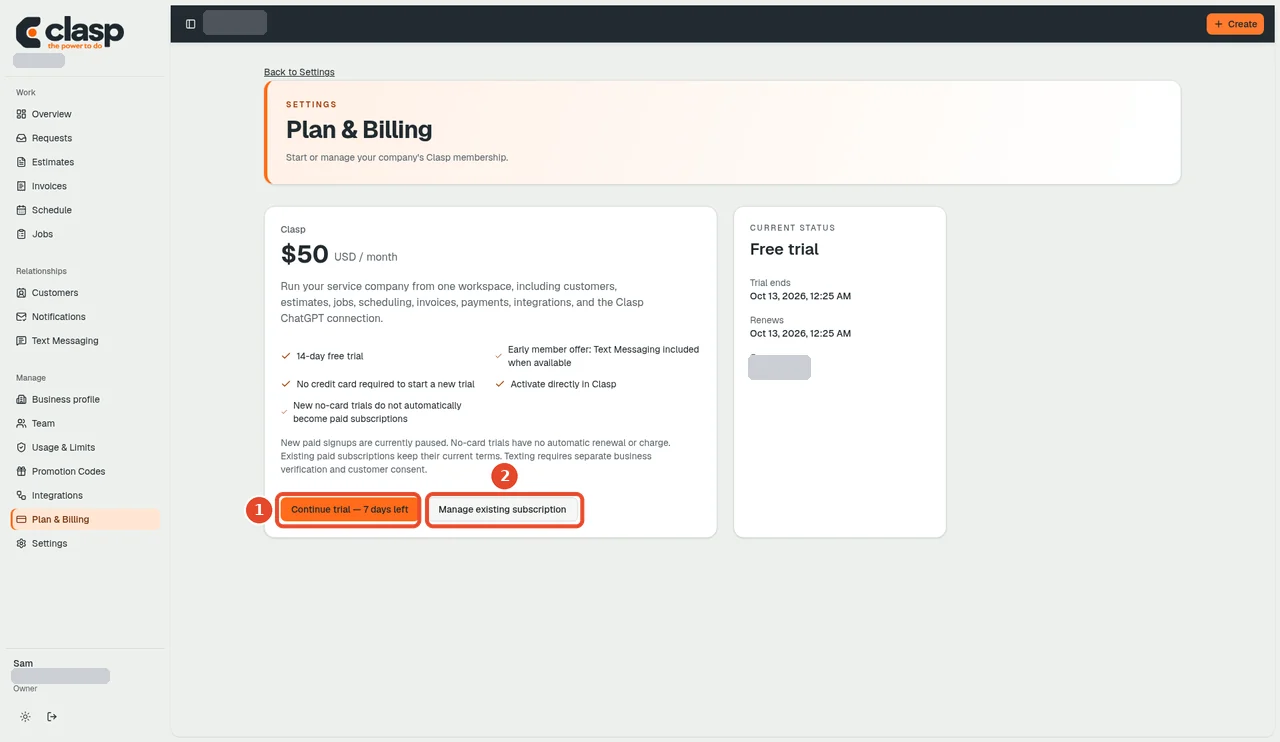
Plan & Billing shows the workspace trial status; choose Continue trial to return to your work. Numbered controls in this screenshot
- 1 — Continue trial: Return to your workspace with the existing trial. This is the already-active state, not the initial activation screen.
- 2 — Manage existing subscription: Use only to manage an existing paid subscription. It is not required to start a no-card trial.
The source and recorded acceptance test describe a 14-day trial without a card or Stripe checkout. Continuing an existing trial does not reset its end date. The trial itself does not add automatic renewal or charge a card.
On Android
The documented no-card trial release places the action under More → Clasp trial. Initial signup remains on the website. Do not assume the same entry exists in the currently installed iPhone build.
If activation fails
Confirm your email, workspace, role, and connection. If the trial has ended, contact Clasp support about available options. Do not create duplicate accounts to reset it.
A Clasp trial does not by itself activate SMS or online customer payments.
Ask Clasp voice allowance
Eligible trial workspaces include up to five voice minutes for Ask Clasp. Voice usage is metered separately from text. Reaching the included voice limit does not restart the trial or create a card charge; continued voice availability depends on the current voice plan. See Ask Clasp.