
Export workspace data and review retention
Find the export, retention and legal-hold controls without confusing them with deletion.
The numbers in these website screenshots identify controls and statuses, not a required click sequence. Example records and amounts are illustrative; mobile layouts may differ.
Find the controls
In the intended workspace, open Settings and find Data governance. Available controls depend on your permissions. Downloading an export and changing retention are separate actions.
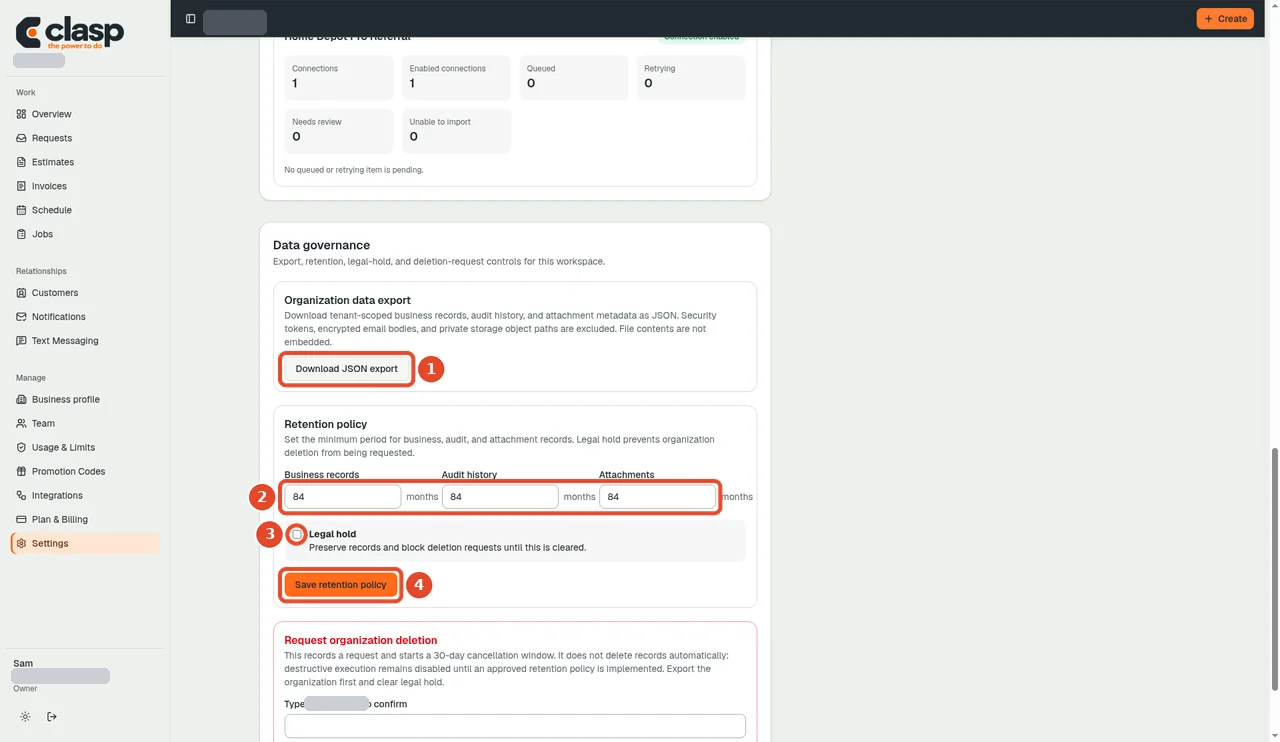
Numbered controls in this screenshot
- 1 — Download JSON export: Download the workspace-scoped JSON export and store it securely.
- 2 — Retention periods: Review business, audit and attachment minimum retention periods; change them only under the business's approved policy.
- 3 — Legal hold: Leave a required legal hold in place. The displayed control preserves records and blocks organization-deletion requests.
- 4 — Save retention policy: Save only authorized retention-policy changes and check the result; downloading an export does not require changing retention.
Download an export
- Confirm you have selected the correct workspace.
- Choose Download JSON export and wait for the download or an error message.
- Store the file securely; it can contain sensitive business records.
The source describes workspace-scoped business records, audit history and attachment metadata. Security tokens, encrypted email bodies and private storage paths are excluded. Attachment file contents are not embedded. This is not a complete attachment backup or a tested restore process.
Review retention separately
The three periods are minimum retention settings for business records, audit history and attachments. Use your business's approved requirements, not the example numbers in the picture. Leave any required legal hold in place. Change and save these settings only with authority to change the business's policy.
Deletion is not export or retention
The separate organization-deletion area is not part of downloading your data. Current source explicitly states that requesting deletion does not automatically destroy records. For deletion or data-rights fulfillment, contact Clasp support; do not assume a request or elapsed date proves completion.
No export, retention change or deletion is executed by this guide. Permissions, file contents and persistence remain part of the later workflow review.