
Set up texting and understand its status
Know what saving, submitting, reviewing, and Ready mean.
The numbers in these website screenshots identify controls and statuses, not a required click sequence. Example records and amounts are illustrative; mobile layouts may differ.
Before setup
Use the actual sending business's details and describe how it obtains permission to text customers. A lead source selection must not substitute for a real consent process.
The separate stages
- Saved details: information has been saved in Clasp.
- Submission/order: Clasp requests the messaging service and submits the application.
- Review: the provider reviews the submitted business and consent evidence.
- Action needed: something needs correction or additional information.
- Ready: Clasp reports service readiness; recipient permission and other send controls still apply.
A successful save does not prove the later stages completed.
After submission
Use Text Messaging and Check status rather than starting a duplicate application. Follow the correction workflow when information is requested.
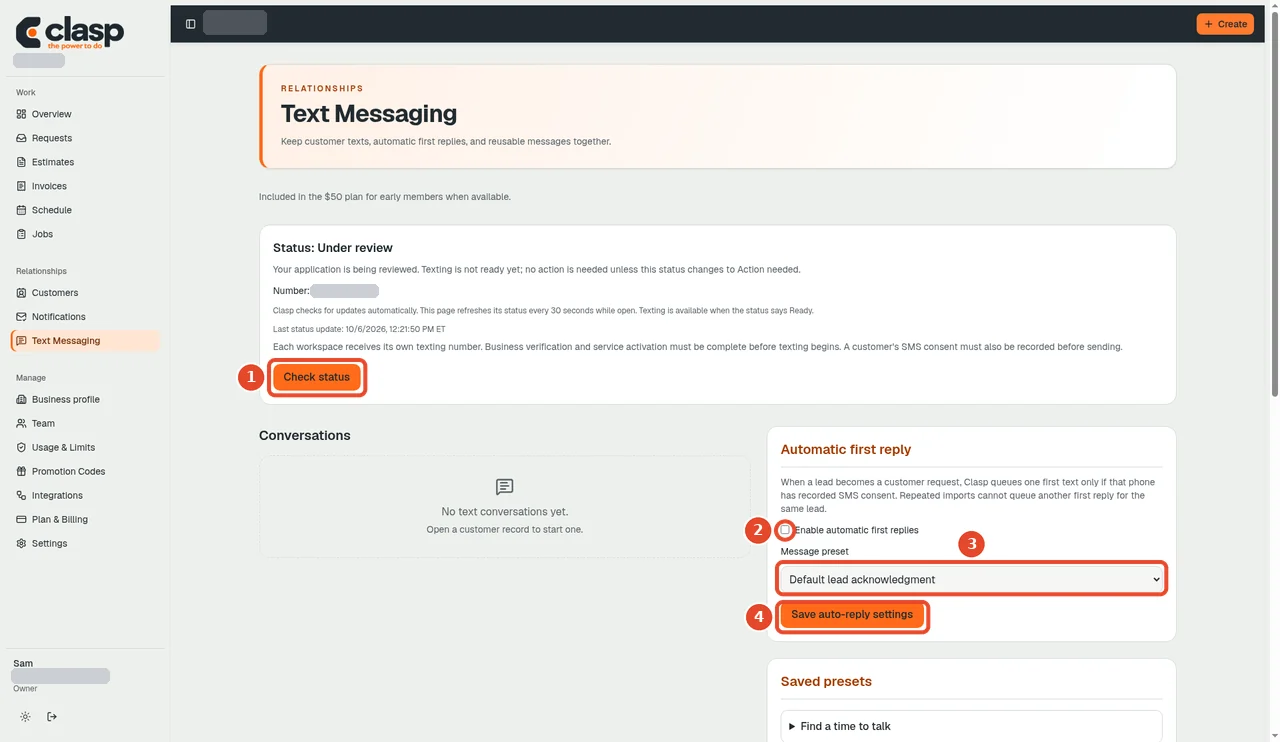
Numbered controls in this screenshot
- 1 — Check status: Request a current status check for the existing application.
- 2 — Enable automatic first replies: This separate auto-reply setting is not required to check status.
- 3 — Message preset: This template choice relates to auto-replies, not verification status.
- 4 — Save auto-reply settings: This saves auto-reply settings, not a new verification application.
If the provider and Clasp disagree, ask support to reconcile the existing request. Do not order a second number to resolve an uncertain status.
Documentation limit
The source includes automatic status synchronization, but current account-specific approval, activation, and actual message delivery were not checked for this help-center setup. This page is not an approval guarantee.
Ask Clasp can save onboarding texting facts or draft and preview a customer message, but it cannot claim provider approval, order a number, or record customer permission. The final SMS action rechecks provider readiness, the active customer and number, consent, and STOP state. Queued is not delivered.
See customer permission and verbal consent.